Stop opening, sorting and retyping every document that arrives.
Invoices, letters and inquiries arrive faster than your team can read them. As each one lands, infoRouter Connect first replaces the names, numbers and other personal details it detects with placeholders. Only that redacted text goes to the AI service. The AI service works out what kind of document it is and writes a brief description, an abstract and a summary. Then it extracts the data that type of document calls for: amounts and due dates from an invoice, the sender and subject from a letter. Connect then puts the real values back before infoRouter stores the result. Outside services never see the original document.
What it is
What is infoRouter Connect?
infoRouter Connect is an optional add-on module for infoRouter, licensed separately, that uses AI to categorize, summarize and extract data from your documents. It installs beside infoRouter on the server you already run. Before any text leaves your network, Connect replaces every sensitive value it detects with a placeholder, so AI services see only the redacted text, never the original document. It works with Anthropic, OpenAI, Microsoft Azure OpenAI, Google Gemini or a self-hosted model.
With Connect, your documents are processed as they arrive, in a folder where you switch it on, or one at a time with “Enhance this document”. It does three jobs your team does by hand today:
Categorize. Connect knows your own list of document categories, the Document Types you define in infoRouter, and matches each document against it. An invoice is categorized as an invoice and a complaint as a complaint, and the match decides which data Connect pulls out next.
Summarize. Each document gets a summary, an abstract and a one-line description, so people know what it is before they open it.
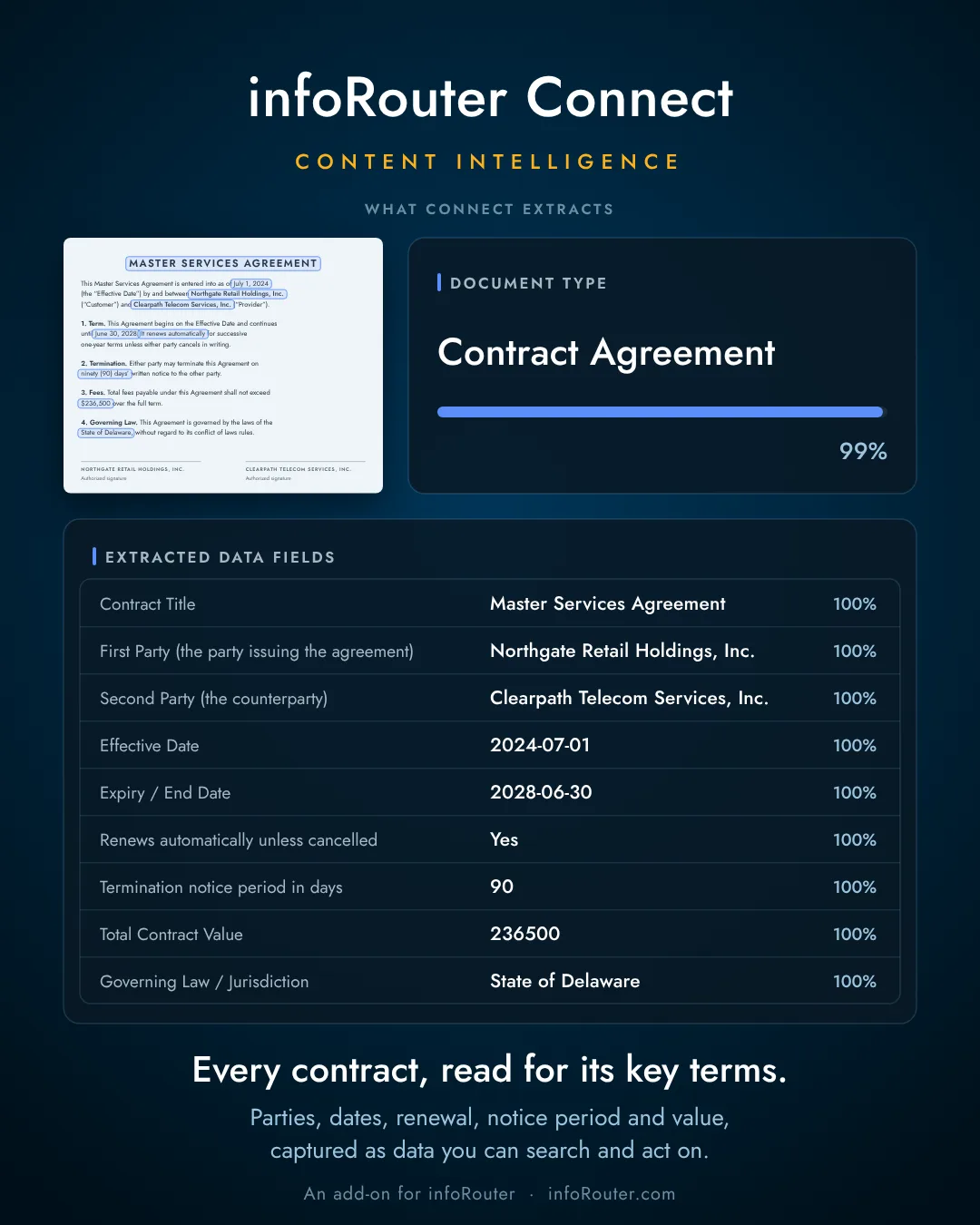
Extract.Invoice numbers, totals, due dates, counterparties and any other Custom Properties (the document's meta information) are read off the page and filled in, ready for a person to approve. Each category has its own Custom Property Set, so a contract gets its parties and expiry date and an invoice its total and due date. That is what lets you ask for “every contract that expires this year” and get exactly those contracts: a search on real fields, not a guess at keywords.
And also: scans go through OCR, with the text stored alongside each document so every word is searchable (no AI service involved), contracts are combed for obligations and deadlines, and safe copies can be produced with the sensitive data removed.
All of it happens with the sensitive information stripped out first. Before any text leaves your network, Connect replaces the personally identifiable information (PII) it detects, such as names, addresses, ID numbers, and bank and card numbers, along with passwords, keys, and anything else you tell it to protect, with placeholders. AI models and outside services see only that redacted text, never the original document. In our own tests, 99% of the planted PII and other sensitive data was stripped before the text was sent to the AI provider, and you can raise that further by giving Connect your own list of customer names, project names and other terms no general detector would know.
An invoice
An invoice that arrives with its data already filled in
Before: an invoice lands in a folder, and someone opens it to type the invoice number, total, due date and vendor into infoRouter before anything else can happen.
After:the invoice lands in a folder where Connect is switched on. Connect reads those fields off the page, shows how confident it is about each one, and hands them to infoRouter for a person to approve. From there it follows the folder's rules, including its retention schedule, like any other document filed there.
In our tests, 96.4% of values came back exactly right across invoices in four currencies. Values Connect is less sure about are flagged for a person to check.
Your data
Use AI on your documents without handing over your sensitive data.
Your staff are probably using AI on documents already, just not safely.
Every contract, claim, invoice and HR file in your infoRouter holds names, dates of birth, account numbers and addresses. Some of it belongs to your customers. Some of it is your own: your staff, your bank details, your credentials, your unpublished terms. To let an AI read those documents, you would have to send them out of your building, to a company whose data-handling terms you did not write.
That is where most AI plans in document management stop. Not because the benefit is unclear. Because the price is your data, and you are right not to pay it.
Holding back does not keep AI out. In a 2025 global study by KPMG and the University of Melbourne, almost half of employees admitted using AI in ways that contravene company policy, including uploading sensitive company information into free public AI tools.KPMG & University of Melbourne, 2025(source, opens in a new tab)IBM's 2025 Cost of a Data Breach Report found that one in five organizations reported a breach due to shadow AI: the AI tools staff use without approval.IBM / Ponemon, 2025(source, opens in a new tab) What to do about shadow AI · Is your document library AI-ready?
How it works
How does Connect protect sensitive data?
Connect installs beside your infoRouter, on the server you already run. Before any text leaves your network, Connect reads the document and replaces every sensitive value it detects with a placeholder. Names, addresses, national IDs, bank and card numbers, medical record numbers, passwords and keys: 38 kinds in all. The AI reads “PERSON_1” and writes its summary. Connect puts the real values back on your own server before infoRouter sees the result.
You can make the protection tighter still. Add your own protected terms: customer names, internal project names, codenames, product names not yet announced, anything specific to your business that a general detector would never recognise. Connect treats them exactly like a bank account number.
The AI company receives only the redacted text: never the original document, and never the values Connect removed. If the cleaning step cannot run, nothing is sent at all.
We measured it. In a scored test with over 200 planted sensitive values across 20 documents, 99% were stripped before sending. Not one social security number, card number, IBAN or bank account got through.
99%
of planted sensitive data stripped before sending
200+
planted values across 20 documents
0
social security, card, IBAN or bank account numbers got through
38
kinds of sensitive value detected and replaced
Evidence
PII protection: a vendor contract, step by step
19_vendor_contract_summary.md
Vendor contract summary
25values replaced before transmission
- 6Organization
- 4Email
- 4Name
- 3Phone
- 2Bank account
- 2Postal address
- 2US EIN
- 1DUNS number
- 1Reference number
Step 1: Original documentstays on your server
# Vendor Contract Summary — Cascade Print Solutions

**Contract ID:** VC-2026-0088
**Prepared for:** Procurement Committee, Meridian Data Services LLC
**Date:** July 15, 2026
**Status:** Executed — effective August 1, 2026

## Parties

**Vendor:** Cascade Print Solutions Inc.
9410 NE Halsey Street, Portland, OR 97220
EIN: 93-1104428 · DUNS: 08-011-4477

**Client:** Meridian Data Services LLC
1800 Congress Avenue, Suite 1200, Austin, TX 78701
EIN: 84-2201157

## Signatories

- **Vendor:** Dana Whitmore, VP Commercial — dana.whitmore@example-cascade.com, direct line (971) 555-0117
- **Client:** Karen Foster, Finance Director — k.foster@meridiandata.example.com, (512) 555-0102

## Commercial Terms

Three-year managed print agreement covering the Austin and Portland offices. Base fee of **$4,850/month** plus per-page overage at $0.011 mono / $0.06 color. Annual increase capped at CPI + 1%. Early termination requires 90 days' notice and a wind-down fee equal to two months' base fee.

## Payment Details

Invoices are due net-30 by ACH to the vendor's account:

- Bank: Umpqua Bank, Portland OR
- Routing: 123205054
- Account: 7702148859
- Remittance contact: ar@example-cascade.com

## Key Obligations

Vendor maintains a 4-hour on-site response SLA (business hours) with penalty credits of 2% of monthly base fee per missed incident, capped at 10% per month. All devices are supplied with disk encryption enabled; decommissioned devices require certified data destruction with certificates delivered to privacy@meridiandata.example.com within 15 days.

## Renewal and Review

The agreement auto-renews for one-year terms unless either party gives notice by May 1, 2029. First commercial review is scheduled for February 2027 with Dana Whitmore ((971) 555-0117) and Karen Foster.
Step 2: Sent to the AI providerwhat Anthropic received
# Vendor Contract Summary — Organization1

**Contract ID:** Reference number1
**Prepared for:** Organization2, Organization3
**Date:** July 15, 2026
**Status:** Executed — effective August 1, 2026

## Parties

**Vendor:** Organization1
Postal address1
EIN: US EIN1 · DUNS: DUNS number1

**Client:** Organization3
Postal address2
EIN: US EIN2

## Signatories

- **Vendor:** Name1, VP Commercial — Email1, direct line Phone1
- **Client:** Name2, Finance Director — Email2, Phone2

## Commercial Terms

Three-year managed print agreement covering the Austin and Portland offices. Base fee of **$4,850/month** plus per-page overage at $0.011 mono / $0.06 color. Annual increase capped at CPI + 1%. Early termination requires 90 days' notice and a wind-down fee equal to two months' base fee.

## Payment Details

Invoices are due net-30 by ACH to the vendor's account:

- Bank: Organization4, Portland OR
- Routing: Bank account1
- Account: Bank account2
- Remittance contact: Email3

## Key Obligations

Vendor maintains a 4-hour on-site response SLA (business hours) with penalty credits of 2% of monthly base fee per missed incident, capped at 10% per month. All devices are supplied with disk encryption enabled; decommissioned devices require certified data destruction with certificates delivered to Email4 within 15 days.

## Renewal and Review

The agreement auto-renews for one-year terms unless either party gives notice by May 1, 2029. First commercial review is scheduled for February 2027 with Name1 (Phone1) and Name2.
Step 3: What the AI sent backstill placeholders
This document summarizes an executed three-year managed print services contract (ID Reference number1) between vendor Organization1 and client Organization3, effective August 1, 2026, covering the Austin and Portland offices. The agreement establishes a base monthly fee of $4,850 plus per-page overages, with payments due net-30 via ACH to Organization4 (routing Bank account1, account Bank account2), and includes a 4-hour on-site response SLA with penalty credits for missed incidents. Key obligations include disk encryption on all devices and certified data destruction upon decommissioning, with the contract auto-renewing annually unless notice is given by May 1, 2029, and a first commercial review scheduled for February 2027 between signatories Name1 and Name2.
Step 4: What the user seesrestored on your server
This document summarizes an executed three-year managed print services contract (ID VC-2026-0088) between vendor Cascade Print Solutions Inc. and client Meridian Data Services LLC, effective August 1, 2026, covering the Austin and Portland offices. The agreement establishes a base monthly fee of $4,850 plus per-page overages, with payments due net-30 via ACH to Umpqua Bank (routing 123205054, account 7702148859), and includes a 4-hour on-site response SLA with penalty credits for missed incidents. Key obligations include disk encryption on all devices and certified data destruction upon decommissioning, with the contract auto-renewing annually unless notice is given by May 1, 2029, and a first commercial review scheduled for February 2027 between signatories Dana Whitmore and Karen Foster.
Generated from a live infoRouter Connect instance. Every figure on this page is measured, not estimated: each AI response is a real provider response, and the detection shown is the same detection that ran on the request.
All documents are synthetic test fixtures. Every name, account, and identifier in them is fictional.
What changes
What your documents start doing on their own
OCR on every scan.
A scanned PDF has no text for search to find. Connect runs OCR on it and stores the text with the document in infoRouter, so every word on the page is searchable. No AI service is involved.
They arrive already described.
A summary, an abstract, a one-line description and keywords, written straight into infoRouter. People find things in one search instead of one afternoon.
They land in the right Document Type.
Your own types, not a vendor's. 99.0% correct on the first choice in our tests, and exactly the same score with data protection switched on. Protecting your data cost nothing here.
Their Custom Properties fill themselves in.
Invoice number, total, due date, counterparty, policy number: whatever your infoRouter Custom Property Sets define. Your staff stop retyping, and your index stops having gaps.
Their obligations surface.
For contracts and agreements, Connect lists what the document commits each party to: who owes what, by when, what happens if it is missed, and the clause it came from. Nothing gets buried on page 14. Like any AI output, check it before you act on it.
You can hand out a safe copy.
When what you owe someone is a document with the sensitive data gone, Connect produces it, one way, with no AI service involved at any point. 99.8% of planted sensitive data removed in a separate test.
See how accurate it is, measuredYour AI account
Which AI services does Connect work with?
Connect does not come with an AI company attached. You bring your own account with Anthropic, OpenAI, Microsoft Azure OpenAI or Google Gemini, or point Connect at any compatible service, including a model running on your own hardware. Your contract, your billing, your data-handling terms. We take no cut and see none of it.
Change providers when a better or cheaper one appears, or when your policy changes. Nothing in infoRouter has to change with it. Your key is entered once, encrypted on that machine, and never shown to anyone again. Every call is logged with what it cost, per document, readable without leaving the server.
There is nothing to migrate out of and nothing held hostage. Your settings and your encrypted keys sit on your own disk.
Safeguards
What stays true, every day
- Nothing leaves your network except the redacted text of the one call you chose to make. The original document never does.
- No document is kept. Working copies are purged as soon as the result is delivered.
- Your AI key never appears on a screen, in a response or in a log.
- You decide where AI runs: switch it on for a folder so every document that lands there is processed, or send a single document with “Enhance this document”. Any operation can be switched off outright.
Same infoRouter. Same server. A library that fills itself in.
Documents that arrive already typed, described and indexed, with their scans OCR’d and searchable, and the sensitive data Connect detected never having left the building. An AI capability you can put in front of your security officer, because “where does the data go?” has a short answer: only redacted text leaves your network, never the document itself.
infoRouter Connect is an annual add-on to infoRouter, included in the guided trial. You bring the AI account. We bring everything between your documents and it.
If your team spends its mornings opening, sorting and retyping documents, a guided infoRouter trial with Connect switched on is the right next step.